MENU
Donate
=TOPIC

4 subtopics in this path

Accessibility & Usability

Readable layouts, color contrast, alt text, keyboard use, accessible tables, clear labels, and usability checks for shared workbooks.

=SUBTOPICS

What to learn inside Accessibility & Usability

Each item pairs the learning structure with curated public YouTube resources where available, so learners can move from outline to video practice quickly.

01Beginner

Readable worksheet structure

Use clear headings, consistent labels, spacing, and table structures.

QUICK NOTES
  • Use one header row per table and real Excel Tables (Ctrl+T) instead of merged cells for titles, so a screen reader announces headers correctly.
  • Avoid merged cells for anything other than a title banner -- they break row/column navigation for screen readers and Ctrl+arrow-key movement.
  • Leave a blank row/column between separate tables on the same sheet instead of relying on borders alone to separate them.
02Beginner

Color contrast and meaning

Choose colors that are readable and do not rely on color alone.

QUICK NOTES
  • Pair every color-coded status with a text label or icon (e.g. 'Late' plus red, not just red) so the meaning survives for colorblind readers or black-and-white printing.
  • Excel's default red/green conditional-formatting pair is one of the hardest combinations for red-green colorblindness -- blue/orange is a safer pair.
  • Check contrast the way a webpage would: dark text on a light fill, not medium-gray on white or pale-yellow-on-white.
03Intermediate

Alt text and object labels

Add useful labels to images, charts, shapes, and important visual objects.

QUICK NOTES
  • Right-click a chart, image, or shape > Edit Alt Text, and describe what it shows and why it matters, not just 'chart' or 'image1'.
  • For a chart, mention the chart type and the takeaway (e.g. 'Bar chart showing Q3 sales up 12% over Q2') rather than restating the axis labels.
  • Decorative shapes with no informational content can be marked 'Decorative' in the Alt Text pane so screen readers skip them instead of reading noise.
04Intermediate

Workbook usability testing

Review whether another person can understand inputs, outputs, and next steps.

QUICK NOTES
  • Hand the file to someone unfamiliar with it and watch where they hesitate or ask a question -- that's the gap, not something found by rereading the layout alone.
  • Try navigating the sheet with only the keyboard (Tab, arrow keys, Ctrl+Home) to catch tab-order or hidden-cell issues a mouse user would never notice.
  • Ask a test reader to state what a number means without explaining it -- if they can't, the label or context is missing, not the reader.
=PREVIEW

Excel in action: Accessibility & Usability

Real Excel screenshots showing what this topic looks like in practice.

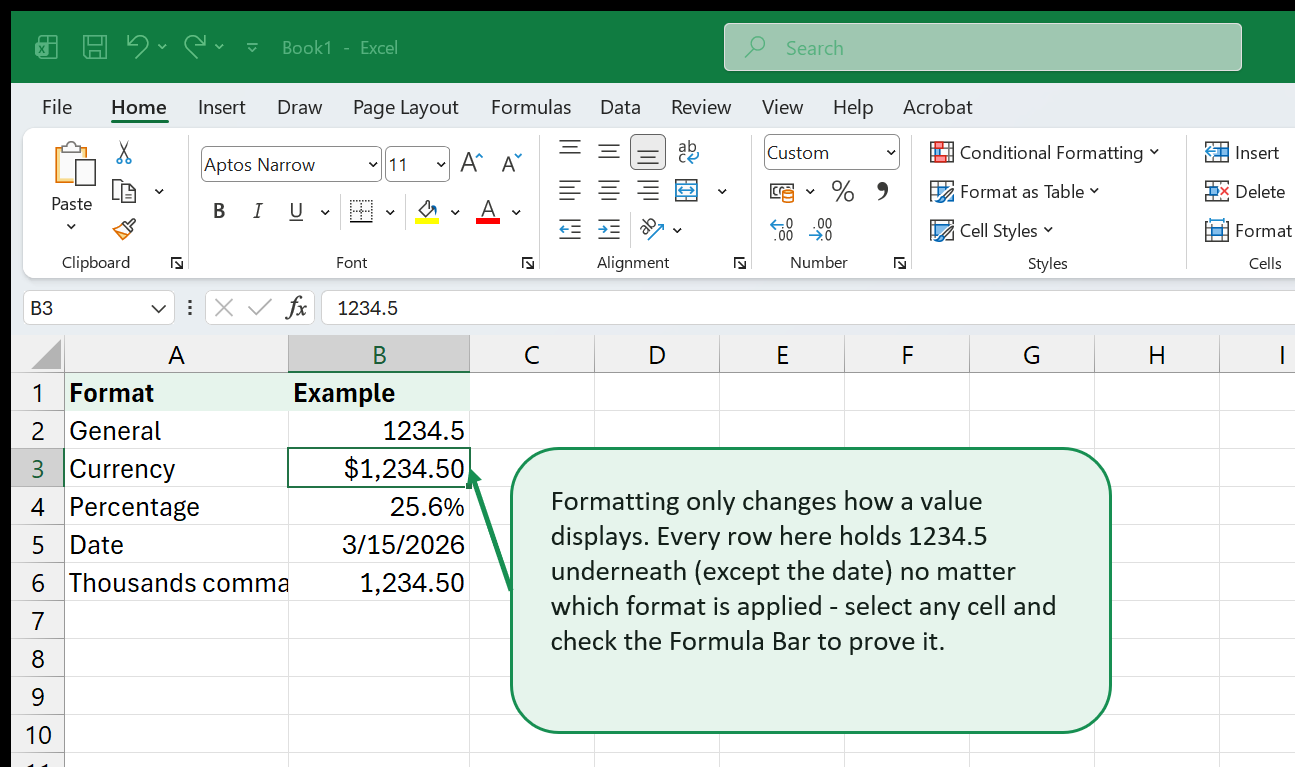
Clear cell formatting improving readability
=VIDEOS

YouTube resources for Accessibility & Usability

video / Intermediate

Enhancing accessibility of Excel spreadsheets

HKU Faculty of Education

Extracted from saved YouTube search results - titled "Enhancing accessibility of spreadsheets", filed under Accessibility & Usability for its accessibility coverage.

Open on YouTube (opens in a new tab)
HKU Faculty of Education

Loading preview…

video / Intermediate

How to run an accessibility check in an Excel workbook

Wolf Helping Hand

Extracted from saved YouTube search results - titled "How to run an accessibility check in an workbook", filed under Accessibility & Usability for its accessibility coverage.

Open on YouTube (opens in a new tab)
Wolf Helping Hand

Loading preview…

video / Intermediate

Disable Accessibility Checker in Excel to Help Make Your Workbooks Run Faster!

Brandon's Excel Tutorials

Extracted from saved YouTube search results - titled "Disable Accessibility Checker in to Help Make Your Workbooks Run Fa...", filed under Accessibility & Usability for its accessibility coverage.

Open on YouTube (opens in a new tab)
Brandon's Excel Tutorials

Loading preview…

video / Intermediate

Accessibility Documents Training - Excel

Texas Education Agency

Extracted from saved YouTube search results - titled "Accessibility Documents Training", filed under Accessibility & Usability for its accessibility coverage.

Open on YouTube (opens in a new tab)
Texas Education Agency

Loading preview…

video / Intermediate

Mastering Excel for Visually Impaired Users: Accessibility Tips & Tricks

KnowHow

Extracted from saved YouTube search results - titled "Mastering for Visually Impaired Users Accessibility Tips & Tricks", filed under Accessibility & Usability for its accessibility coverage.

Open on YouTube (opens in a new tab)
KnowHow

Loading preview…

video / Intermediate

How to Use the Accessibility Checker in Excel

Brandon's Excel Tutorials

Extracted from saved YouTube search results - titled "How to Use the Accessibility Checker in", filed under Accessibility & Usability for its accessibility coverage.

Open on YouTube (opens in a new tab)
Brandon's Excel Tutorials

Loading preview…

video / Intermediate

Excel Accessibility Checker Guide

Paschal Ugwu Solutions

Extracted from saved YouTube search results - titled "Accessibility Checker", filed under Accessibility & Usability for its accessibility coverage.

Open on YouTube (opens in a new tab)
Paschal Ugwu Solutions

Loading preview…

video / Intermediate

Excel Lesson 8i Using the Accessibility Checker

Randy Parazine

Extracted from saved YouTube search results - titled "Lesson 8i Using the Accessibility Checker", filed under Accessibility & Usability for its accessibility coverage.

Open on YouTube (opens in a new tab)
Randy Parazine

Loading preview…

video / Intermediate

Microsoft Excel - How to check accessibility in a workbook

iorad

Extracted from saved YouTube search results - titled "How to check accessibility in a workbook", filed under Accessibility & Usability for its accessibility coverage.

Open on YouTube (opens in a new tab)
iorad

Loading preview…

video / Intermediate

MS Excel-Review Tab-Accessibility Group in Check the Accessibility of Workbooks in English

Study Creation@Kirti Suryawanshi

Extracted from saved YouTube search results - titled "Review Tab Accessibility Group in Check the Accessibility of Workbo...", filed under Accessibility & Usability for its accessibility coverage.

Open on YouTube (opens in a new tab)
Study Creation@Kirti Suryawanshi

Loading preview…