MENU
Donate
=TOPIC

4 subtopics in this path

Conditional Formatting

Rules, formulas, icon sets, color scales, data bars, duplicate checks, variance flags, and report-friendly highlighting.

=SUBTOPICS

What to learn inside Conditional Formatting

Each item pairs the learning structure with curated public YouTube resources where available, so learners can move from outline to video practice quickly.

01Beginner

Highlight cells rules

Flag values above, below, between, duplicate, or matching text conditions.

YOUTUBE
video / Intermediate

Excel Conditional Formatting in Depth

Technology for Teachers and Students

Open on YouTube (opens in a new tab)
Technology for Teachers and Students

Loading preview…

02Intermediate

Formula-based rules

Use TRUE/FALSE formulas to format whole rows, dynamic ranges, and exception lists.

QUICK NOTES
  • New Rule > 'Use a formula to determine which cells to format' takes any formula that returns TRUE or FALSE.
  • Write the formula against the top-left cell of the selected range using relative references (e.g. =$D2="Late") so it correctly adjusts for every other cell in the selection.
  • To format an entire row based on one column's value, lock just that column with $ (e.g. $D2, not $D$2) and apply the rule to the full row range.
03Intermediate

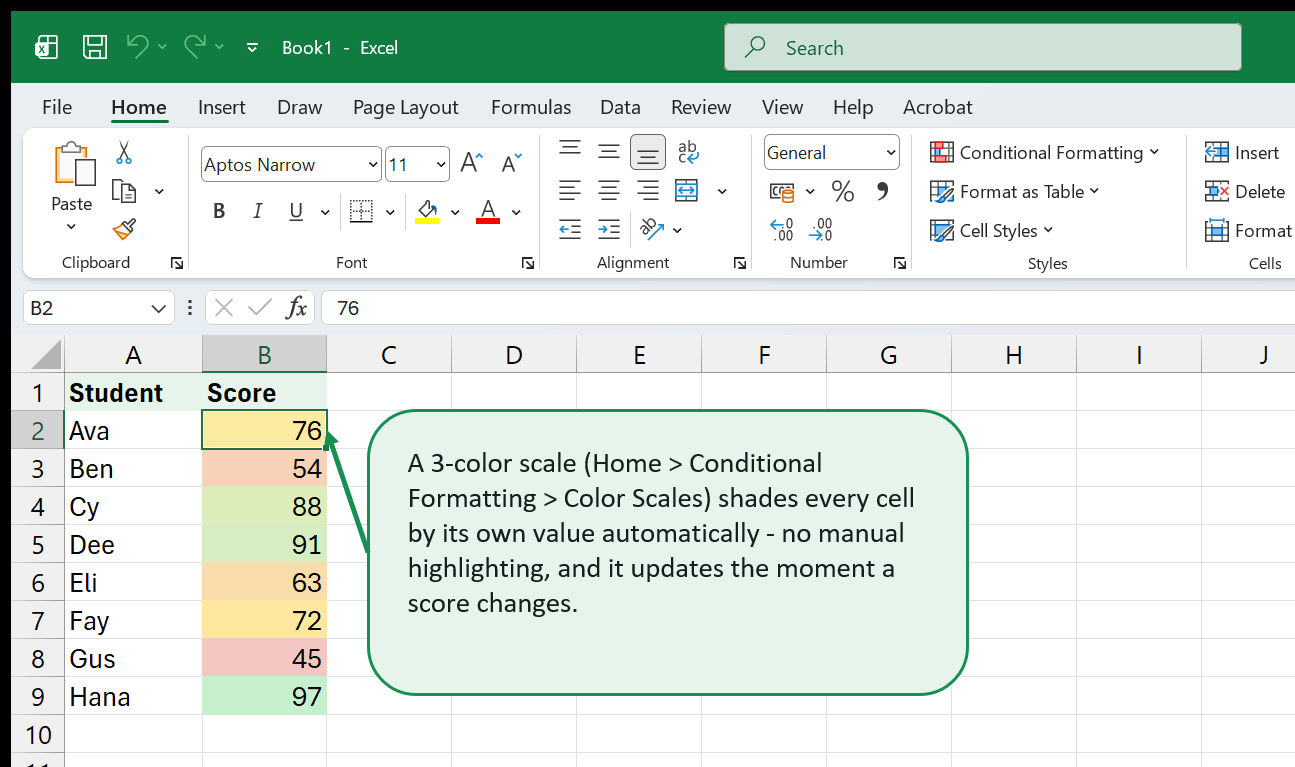
Icon sets, data bars, and color scales

Add compact visual signals that help people scan performance and priority quickly.

QUICK NOTES
  • Manage Rules > Edit Rule lets you set fixed thresholds (number/percent/percentile) instead of the default even split, which can mislabel skewed data.
  • Data bars have a 'Show Bar Only' option (in Edit Rule) to hide the number and keep just the bar, for a cleaner mini-chart look inside a cell.
  • One icon set or color scale per column is usually enough -- stacking several visual signals on the same values makes them harder to read, not easier.
04Advanced

Conditional formatting for dashboards

Use clean rules for KPI flags, status lights, heatmaps, and management reports.

QUICK NOTES
  • Use icon sets or data bars sparingly -- one signal per metric is easier to scan than three overlapping rules.
  • Base status colors on a helper column (e.g. a variance %) rather than hardcoding thresholds inside every rule, so updating the target only means editing one formula.
  • In Manage Rules, check the 'Stop If True' order -- the first matching rule wins, so put the most specific condition first.
=PREVIEW

Excel in action: Conditional Formatting

Real Excel screenshots showing what this topic looks like in practice.

Conditional formatting rules highlighting cells based on values
=VIDEOS

YouTube resources for Conditional Formatting

video / Intermediate

Conditional Formatting in Excel Tutorial

Kevin Stratvert

Extracted from saved YouTube search results - titled "Conditional Formatting in", filed under Conditional Formatting.

Open on YouTube (opens in a new tab)
Kevin Stratvert

Loading preview…

video / Intermediate

Excel Conditional Formatting in Depth

Technology for Teachers and Students

Extracted from saved YouTube search results - titled "Conditional Formatting in Depth", filed under Conditional Formatting.

Open on YouTube (opens in a new tab)
Technology for Teachers and Students

Loading preview…

video / Intermediate

Master Conditional Formatting in Excel (The CORRECT Way)

Kenji Explains

Extracted from saved YouTube search results - titled "Master Conditional Formatting in (The CORRECT Way)", filed under Conditional Formatting.

Open on YouTube (opens in a new tab)
Kenji Explains

Loading preview…

video / Intermediate

Excel Conditional Formatting: Beginners to Advanced

Simon Sez IT

Extracted from saved YouTube search results - titled "Conditional Formatting Beginners to Advanced", filed under Conditional Formatting.

Open on YouTube (opens in a new tab)
Simon Sez IT

Loading preview…

video / Intermediate

Excel Conditional Formatting with Formula

Leila Gharani

Extracted from saved YouTube search results - titled "Conditional Formatting with Formula", filed under Conditional Formatting.

Open on YouTube (opens in a new tab)
Leila Gharani

Loading preview…

video / Intermediate

EXCEL, Conditional Formatting EXPLAINED, [IGCSE ICT 0417]

Nicos Paphitis

Extracted from saved YouTube search results - titled ", Conditional Formatting EXPLAINED, [IGCSE ICT 0417]", filed under Conditional Formatting.

Open on YouTube (opens in a new tab)
Nicos Paphitis

Loading preview…

video / Intermediate

Conditional Formatting in Excel

TutorialsPoint

Extracted from saved YouTube search results - titled "Conditional Formatting in", filed under Conditional Formatting.

Open on YouTube (opens in a new tab)
TutorialsPoint

Loading preview…

video / Intermediate

Conditional Formatting in Excel

Online Two

Extracted from saved YouTube search results - titled "Conditional Formatting in", filed under Conditional Formatting.

Open on YouTube (opens in a new tab)
Online Two

Loading preview…

video / Intermediate

Conditional Formatting in Excel

Simon Sez IT

Extracted from saved YouTube search results - titled "Conditional Formatting in", filed under Conditional Formatting.

Open on YouTube (opens in a new tab)
Simon Sez IT

Loading preview…

video / Intermediate

Conditional Formatting in Excel

Alex The Analyst

Extracted from saved YouTube search results - titled "Conditional Formatting in", filed under Conditional Formatting.

Open on YouTube (opens in a new tab)
Alex The Analyst

Loading preview…

video / Intermediate

Excel Conditional Formatting (Overview + Advanced Examples)

TrumpExcel

Extracted from saved YouTube search results - titled "Conditional Formatting (Overview + Advanced Examples)", filed under Conditional Formatting.

Open on YouTube (opens in a new tab)
TrumpExcel

Loading preview…

video / Intermediate

Excel Conditional Formatting Tutorial

The Organic Chemistry Tutor

Extracted from saved YouTube search results - titled "Conditional Formatting", filed under Conditional Formatting.

Open on YouTube (opens in a new tab)
The Organic Chemistry Tutor

Loading preview…