MENU
Donate
=TOPIC

4 subtopics in this path

Excel Copilot & AI

Excel Copilot, prompt writing, formula help, summaries, data analysis questions, review checks, and safe AI-assisted workflows.

=SUBTOPICS

What to learn inside Excel Copilot & AI

Each item pairs the learning structure with curated public YouTube resources where available, so learners can move from outline to video practice quickly.

01Beginner

Prompting for spreadsheet help

Ask clear questions about formulas, cleanup, summaries, and workbook structure.

QUICK NOTES
  • State the exact range/table and the outcome wanted ('Sum column C where column A is "East"') rather than describing the goal vaguely.
  • Ask for one formula or one step at a time for anything that'll need explaining to someone else later -- easier to verify than a multi-step black box.
  • If the first answer looks close but not right, say specifically what's wrong rather than re-asking the same question.
02Intermediate

AI-assisted formula writing

Use AI suggestions while checking references, assumptions, and edge cases yourself.

QUICK NOTES
  • Treat a generated formula as a draft -- check every cell reference and range against the actual sheet before trusting the result.
  • Test it on a row with an already-known correct answer, not just on data where the result can't easily be verified.
  • Ask it to explain the formula back in plain English -- if the explanation doesn't match what was asked, the formula probably doesn't either.
03Intermediate

AI summaries and insights

Ask for trends, exceptions, and summaries from table-shaped data.

QUICK NOTES
  • Give it a real Table or named range, not a loose block of cells -- structured data produces more reliable summaries.
  • Cross-check any stated total, trend, or outlier against a quick PivotTable or SUM/AVERAGE before repeating it to someone else.
  • Ask a narrow question ('which region grew fastest') rather than 'summarize this' when a specific, checkable answer is needed.
04Advanced

AI review safety

Check generated formulas, avoid sensitive data exposure, and verify any automated conclusions.

QUICK NOTES
  • Never paste or connect data containing customer PII, financial account numbers, or credentials into an AI tool without checking organizational policy first.
  • Re-derive at least one AI-generated number by hand (a SUM, a COUNT) before using it in a report someone else will rely on.
  • A wrong formula that looks plausible is more dangerous than one that's obviously broken -- verifying means checking the logic, not just glancing at the output.
=PREVIEW

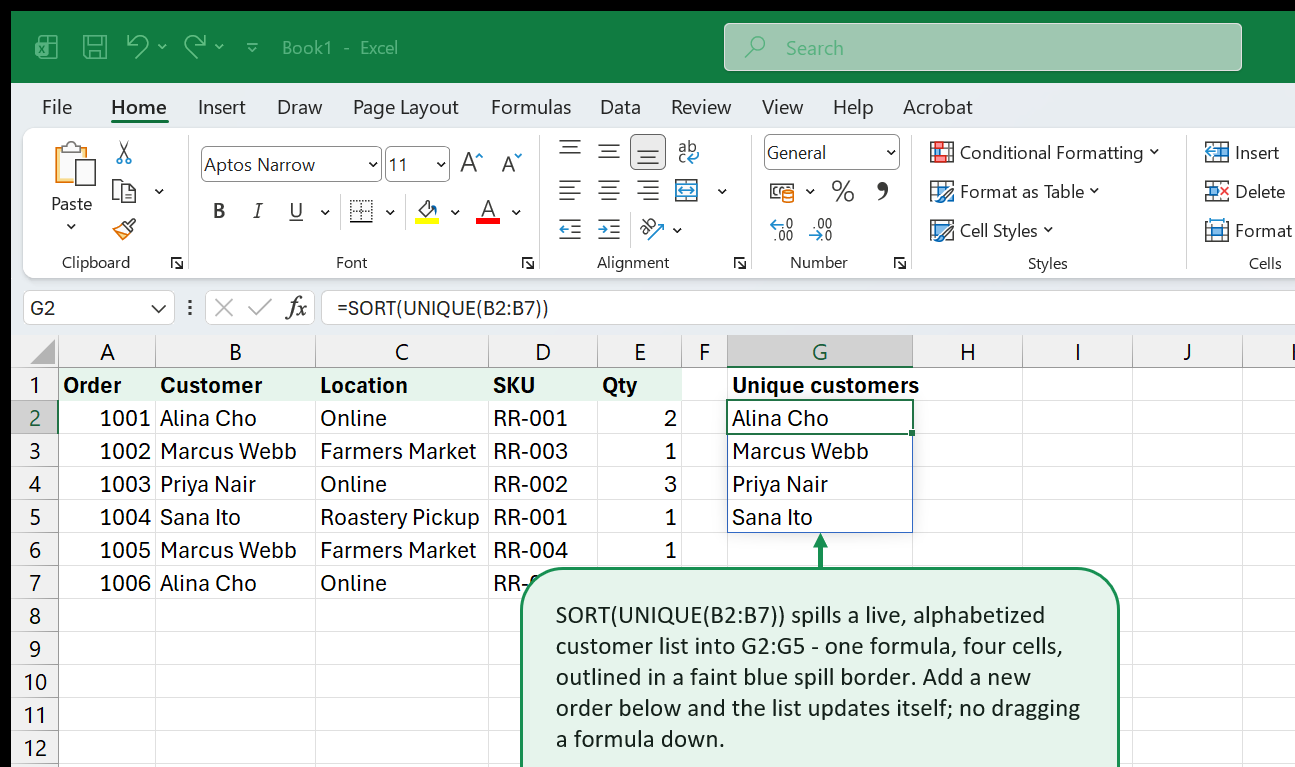
Excel in action: Excel Copilot & AI

Real Excel screenshots showing what this topic looks like in practice.

Dynamic array formula with UNIQUE function
=VIDEOS

YouTube resources for Excel Copilot & AI

video / Intermediate

Copilot Excel Tutorial - Excels Biggest Upgrade Ever

Kevin Stratvert

Extracted from saved YouTube search results - titled "Copilot Excels Biggest Upgrade Ever", filed under Excel Copilot & AI for its Copilot coverage.

Open on YouTube (opens in a new tab)
Kevin Stratvert

Loading preview…

video / Intermediate

Excel Copilot Tutorial

Learn Skills Daily

Extracted from saved YouTube search results - titled "Copilot", filed under Excel Copilot & AI for its Copilot coverage.

Open on YouTube (opens in a new tab)
Learn Skills Daily

Loading preview…

video / Intermediate

Major COPILOT in EXCEL Advancements! Now Everyone Can Be an Excel EXPERT

Collaboration Simplified

Extracted from saved YouTube search results - titled "Major COPILOT in Advancements! Now Everyone Can Be an EXPERT", filed under Excel Copilot & AI for its Copilot coverage.

Open on YouTube (opens in a new tab)
Collaboration Simplified

Loading preview…

video / Intermediate

How to Use Copilot in Excel: Full Tutorial (2025)

Lisa Crosbie

Extracted from saved YouTube search results - titled "How to Use Copilot in ( )", filed under Excel Copilot & AI for its Copilot coverage.

Open on YouTube (opens in a new tab)
Lisa Crosbie

Loading preview…

video / Intermediate

How to use Copilot in Excel (Step-by-Step Guide)

Teacher's Tech

Extracted from saved YouTube search results - titled "How to use Copilot in (Step by Step )", filed under Excel Copilot & AI for its Copilot coverage.

Open on YouTube (opens in a new tab)
Teacher's Tech

Loading preview…

video / Intermediate

Microsoft Copilot in Excel: Here's How to Use It

Lisa Crosbie

Extracted from saved YouTube search results - titled "Copilot in Here's How to Use It", filed under Excel Copilot & AI for its Copilot coverage.

Open on YouTube (opens in a new tab)
Lisa Crosbie

Loading preview…

video / Intermediate

You Wont Believe What Excels Copilot Can Do! (new updates)

Leila Gharani

Extracted from saved YouTube search results - titled "You Wont Believe What Excels Copilot Can Do! (new updates)", filed under Excel Copilot & AI for its Copilot coverage.

Open on YouTube (opens in a new tab)
Leila Gharani

Loading preview…

video / Intermediate

How to Use Copilot in Excel: Full Tutorial 2026

Kenji Explains

Extracted from saved YouTube search results - titled "How to Use Copilot in", filed under Excel Copilot & AI for its Copilot coverage.

Open on YouTube (opens in a new tab)
Kenji Explains

Loading preview…

video / Intermediate

Agent Mode in Excel: Build and Edit Spreadsheets with Copilot

Microsoft 365

Extracted from saved YouTube search results - titled "Agent Mode in Build and Edit Spreadsheets with Copilot", filed under Excel Copilot & AI for its Copilot coverage.

Open on YouTube (opens in a new tab)
Microsoft 365

Loading preview…

video / Intermediate

Top Excel Copilot Features You Need to Know

Benjamin Preston

Extracted from saved YouTube search results - titled "Top Copilot Features You Need to Know", filed under Excel Copilot & AI for its Copilot coverage.

Open on YouTube (opens in a new tab)
Benjamin Preston

Loading preview…

video / Intermediate

This Copilot for Excel Feature Feels Like Cheating

Collaboration Simplified

Extracted from saved YouTube search results - titled "This Copilot for Feature Feels Like Cheating", filed under Excel Copilot & AI for its Copilot coverage.

Open on YouTube (opens in a new tab)
Collaboration Simplified

Loading preview…